

Show us what you think the Bears’ offseason should look like. This document lets you re-create the Bears roster as you see fit.
Do you think you can build out the perfect Chicago Bears roster? Now, you can prove it and show it off for everyone to see. Just open the Google Docs link below, save the workbook onto your device, and get a head start on your prep for that GM job!
After you open the document, click “File,” then select “Make a Copy” and follow the prompts to create a copy. If you do not do this, you will not have access to any of the functions within the sheet.
CLICK HERE TO SEE IF YOU CAN MAKE THE PERFECT BEARS ROSTER!
I’ve added screenshots below for guidance. The rules are simple. Any section highlighted in yellow allows you to select a choice from a drop-down box or type in free form. Additionally, a video tutorial can be found in the YouTube video below.
Story continues below.
More Sports News
How to Watch Chicago Bulls at Boston Celtics, TV Channel, Start Time, Betting Odds, Preview

2 days ago
Chicago Fire 2-2 Austin FC in Game Two at Coachella Valley Invitational

2 days ago
A Worthy Flier: Cubs Sign Kyle Wright to Minor League Deal, With Spring Training Invite

3 days ago
Chicago Bulls’ Matas Buzelis Featured in the Latest Lyrical Lemonade Lunch Break Freestyle

4 days ago
3 Standout Performers from Chicago Fire’s Preseason Win Over LA Galaxy

4 days ago
How to Watch Chicago Bulls at Brooklyn Nets, TV Channel, Start Time, Betting Odds, Preview
4 days ago
NBA Close to Expanding the League by Two Teams This Summer

4 days ago
New Era: Different Team, Same Results — Bulls Fall to Denver 136-120
4 days ago
Super Bowl LX 2026 Betting Guide: Patriots vs Seahawks Best Odds, Props and Picks

5 days ago
Chicago Fire defeat LA Galaxy 3-2 in Coachella Valley Invitational Opener

5 days ago
.wp-block-group__inner-container:has(> .embla),
.wp-block-group:where(.alignfull) > .wp-block-group__inner-container:has(> .embla) {
width: calc(100vw – (var(–side-spacing) * 2)) !important;
}
.embla {
position: relative;
overflow: hidden;
}
.embla__container {
display: flex;
flex-wrap: nowrap;
gap: 0 !important;
width: 75%;
}
.embla__slide {
margin-inline-end: var(–column-gap);
}
.embla__arrow,
.embla__arrow:active,
.embla__arrow:target,
.embla__arrow:hover,
.embla__arrow:focus-visible {
display: none;
position: absolute;
top: 50%;
transform: translateY(-50%);
width: 40px;
height: 40px;
margin: 0;
padding: 0;
line-height: 0;
background: rgba(255, 255, 255, 0.75);
color: var(–color-primary);
border-radius: 100vw;
svg {
width: 24px;
}
}
.embla__prev {
left: 0;
}
.embla__next {
right: 0;
}
]]>
After you open the document, click “File,” then select “Make a Copy” and follow the prompts to create a copy. If you do not do this, you will not have access to any of the functions within the sheet.
Step 1: Choose Who to Cut from the Bears Roster
The first step in any Bears offseason is establishing the foundation for your roster and salary cap space. This section is where you can do just that. Want to trade Cairo Santos for the No. 2 overall pick? Go for it! But let’s keep things realistic. The screenshots below provide a quick example from previous years. There’s no need to analyze what I did here since I was mainly testing the model and setting up straightforward examples.
The sections with the dropdown boxes are the areas you should edit in the “Cuts + Trades” tab. The options under the “Status” column are “Cut Pre-6/1,” “Cut Post 6/1,” “Trade Pre 6/1,” “Trade Post 6/1,” or “Convert Salary”. The “Convert Salary” option is new, converting the player’s base salary to a signing bonus. Each option will generate the resulting salary cap implications for you. All cap data was pulled from OverTheCap.com.
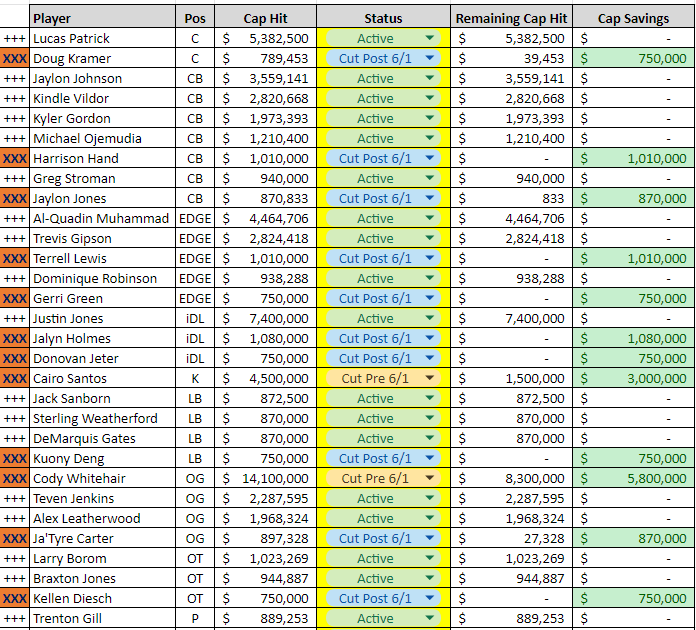 Make cuts to the Bears roster as you see fit.
If you choose to trade away picks, you can track that using the “Trading Draft Picks?” table, featured on the right side of the sheet. Additionally, I added a new feature last year for “Trade Write-In” players. If you were to trade draft picks (or players) for a player on another team, you denote which players or picks have been traded in the drop-down boxes, write the new player’s name in one of the cells that says “TRADE WRITE IN,” then you go pull their contract info from OverTheCap.com. Don’t forget to go to the new player’s drop-down box and change it from N/A to ACTIVE!
Step 2: Add Free Agents and Rookies to the Bears Roster
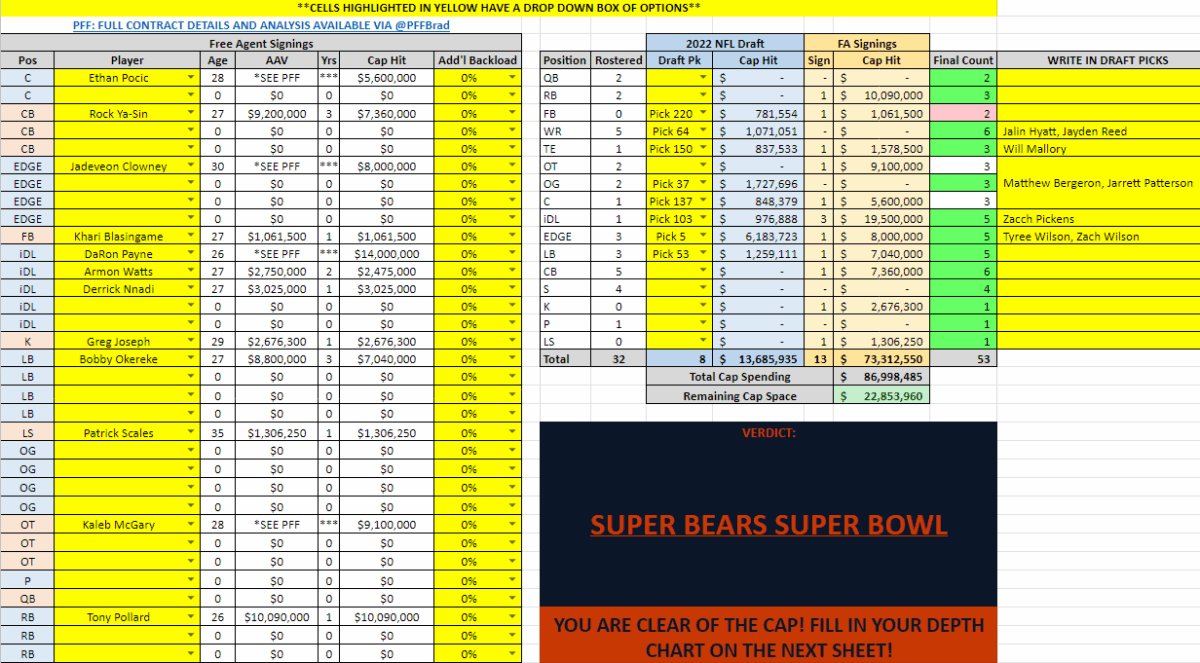 We all know where to find the sleepers and the obvious free-agent additions
On the left side of the spreadsheet, you will choose the free agents you would like to sign. Their Year 1 cap hits are determined by the length of their projected contracts. The Year 1 cap hit in a two-year deal will be 95% of the contract AAV. If it’s a three-year deal, the Year 1 cap hit will be 90% of the contract AAV. And so on. If you want to backload the contract further, you can do so.
Additionally, you can review available free agents under the “FREE AGENTS” tab. Here, you can see each free agent, their projected contract, and the source or comp used to determine it. If you choose, you can adjust the contract metrics yourself.
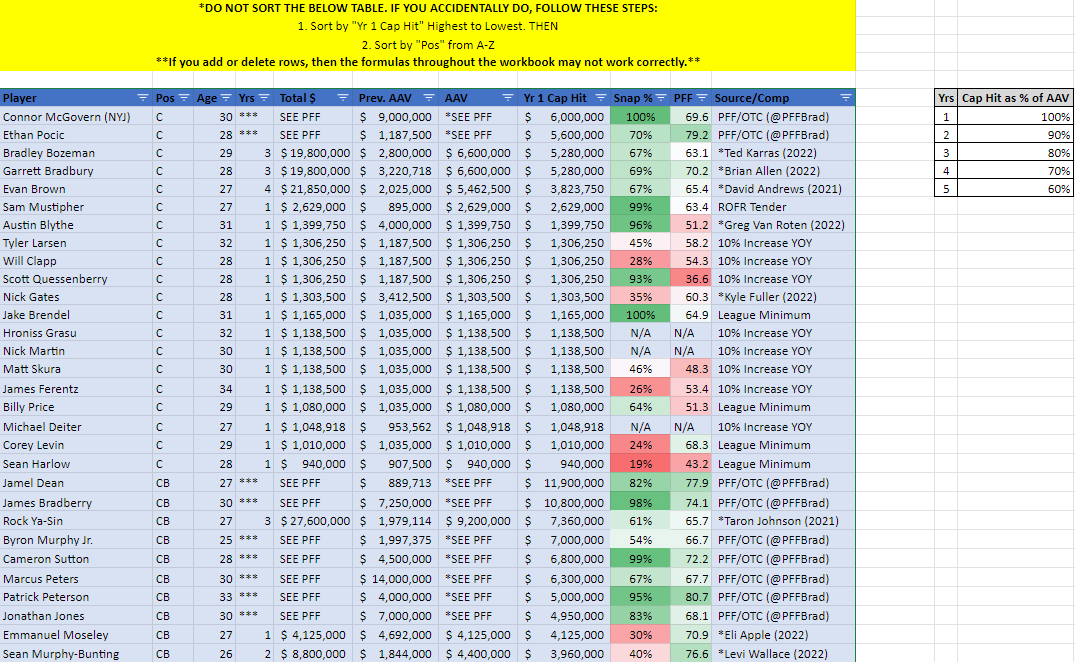 Reviewing the top paid centers and cornerbacks in NFL free agency
I should note that any projections I obtained from PFF have been redacted in the document, only showing a Year 1 cap hit that I projected using my own formula. PFF does good work and doesn’t deserve to have it handed out without the clicks and subscriptions required to access it. Check out their projections for yourself.
Other free-agent contracts were also based on estimated player values found at Over The Cap. Within the premium features on that website, they provide an “estimated value” for every player in the NFL. Jason Fitzgerald deserves a major shoutout for his work with that website. Check out his work and give him a follow on X/Twitter as well.
Finally, Spotrac has beefed up its contract projection model in recent years. Their projections factored into my contract projections to varying degrees.
I’ve included links to two different mock draft simulators in the top right corner of the “FA + Draft” tab. Once you complete the draft, fill in the draft columns and write who your picks were. Aside from draft picks, the rest of the table on the right will auto-fill as you make your free-agent signings on the left.
A quick tip for mock drafts: if you choose to trade up or down in the draft, you can go back to the “Cuts and Trades” tab and input those picks you traded for into the draft trade table. This will allow you to include the cap hit with those draft picks you acquired.
The goal is to reach 51 players on the roster without going over the salary cap. If you go over the cap, the “SUPER BEARS SUPER BOWL” graphic will change colors and have a quick message for you to try again.
Step 3: Build Your Depth Chart
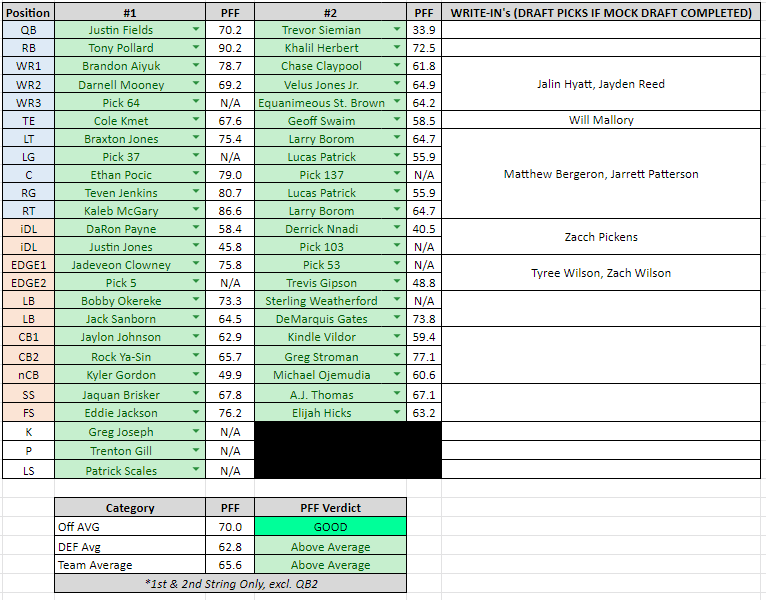 Final Chicago Bears Roster and Depth Chart Projections
Drop-down boxes of your rostered players, free-agent signings, and draft picks (i.e. pick X rather than the player you selected) are available on this page for you to fill in the depth chart. Each player’s 2025 PFF grade will autofill into the chart and give you a verdict on the offense, defense, and team average PFF grades.
Enjoy, and nail down the Chicago Bears roster so Ryan Poles doesn’t have to! The Bears are back, it’s time to make it 4x off-season champs!